
OneCleaner
Science VRTools
3.517.00 Reviews
- Version
- 1.3.0
- Installs
- 500.00K
- Age Rating
- Everyone
Screenshots
Our Review of OneCleaner
 Analysis by Appyee
I installed OneCleaner expecting a straightforward way to deal with the storage clutter that slowly builds up on a phone. Its purpose is easy to understand: help manage storage, identify large files, and find duplicate photos. That narrow focus is also what makes it interesting. Many cleaning tools try to become full device managers, security scanners, battery optimizers, and notification hubs. This app stays centered on the mess that is easiest to ignore until the phone starts feeling crowded.
My first impression was that OneCleaner is most useful when I approach it as a maintenance tool rather than a magic speed booster. It can help me see what is taking up space and decide what deserves to stay, but the important decisions remain mine. That distinction matters because deleting a large video or a duplicate image is simple; knowing whether I will need it later is not.
What OneCleaner feels like after the first week
The first week is where this storage utility has the strongest appeal. A newly installed cleaner gives me a reason to look at files I have been postponing. Large videos, repeated screenshots, old downloads, and photo copies are much easier to deal with when they are gathered into a focused cleanup session instead of being discovered one by one through a file browser.
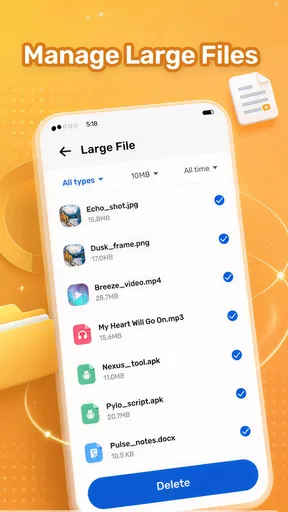
The large-file function is particularly practical for anyone who records a lot of video or receives media through messaging apps. A file that looks harmless in a conversation can occupy far more space than expected, while several old clips can quietly become the main reason available storage is shrinking. OneCleaner gives that kind of clutter a clear place to be reviewed.
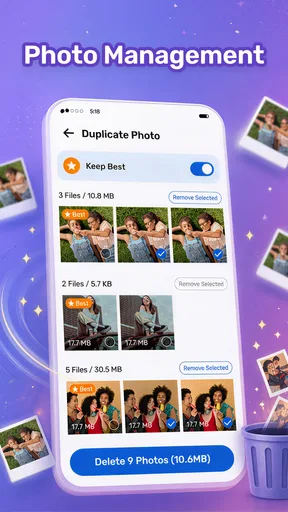
Duplicate-photo cleanup is useful for a different reason. Photo libraries often contain several versions of the same moment: an edited copy, a shared copy, a screenshot of the original, or repeated images created by accidental taps. The real benefit is not simply finding duplicates; it is reducing the visual noise that makes a library harder to browse.
I would still inspect every suggested photo before removing it. Similar images are not always interchangeable. A cleaner may identify files that look alike, but one version might have a better crop, higher quality, or useful editing history. The safest habit is to treat the results as recommendations and confirm them manually, especially when the images are personal or irreplaceable.
The app is free, which makes experimenting with it easy. It is also rated for Everyone, so its basic purpose is accessible to a broad range of users. The developer is Science VR, and the app belongs in the practical side of the tools category rather than the entertainment or social space.
OneCleaner has reached over half a million installs, and its average rating is three and a half stars from around five hundred ratings. I read that as a sign of moderate usefulness rather than universal satisfaction. The app clearly attracts people who want a simpler cleanup route, but a rating in that range also suggests that the experience may not feel equally smooth on every phone or for every type of user.
A sensible first cleanup workflow
My preferred first session would begin with large files, not duplicate photos. Large files are usually easier to judge because their size and purpose are more obvious. I can review a long recording, an obsolete download, or a video I already backed up without having to compare several nearly identical pictures.
After that, I would move to duplicate photos in small batches. Instead of selecting everything at once, I would review one group at a time and keep the version that has the best composition or clearest detail. This takes longer, but it avoids the common mistake of allowing an automated cleanup to make personal decisions on my behalf.
A useful third step is to pause before finishing and ask whether the recovered space solves a real problem. If the phone was warning about low storage, the cleanup has an immediate purpose. If storage was comfortable, the session is still worthwhile, but I would avoid deleting marginal files simply to make the results look impressive.
That workflow reveals one of the app’s less obvious trade-offs: finding clutter is faster than deciding what to do with it. OneCleaner can organize the inspection process, but it cannot know which memories matter, which work files are still active, or which download is needed for a trip next week. The more valuable the files, the more important the human review becomes.
Does it keep earning space after the novelty fades?
I find the long-term case for OneCleaner depends less on how often I scan than on whether each session fits a real need. Before opening it, I’d decide what I’m trying to make room for, then review only the large files or photo groups relevant to that goal. That keeps cleanup purposeful and makes it easier to judge whether the app still helps after the obvious clutter is gone.
Month-to-month value depends on your storage habits
After the first cleanup, the app’s lasting value depends on how quickly new clutter appears. Someone who takes many photos, downloads media regularly, or uses a phone as a camera may find a recurring role for it. Someone with a small photo library and plenty of free space may open it once, remove a few obvious items, and have little reason to return.
I see the strongest long-term use case in a monthly or occasional review rather than daily monitoring. Daily cleaning would turn a simple maintenance task into another notification-like obligation. A monthly check, or a session before a major trip or operating-system update, is more realistic. It creates a routine without making storage management feel like a second job.
One practical habit is to run a review after a period of heavy media use. For example, after returning from a holiday, I would first copy the photos I genuinely want to preserve, then use the large-file view to examine long videos and the duplicate-photo view to remove obvious repetitions. This separates preservation from deletion and lowers the risk of cleaning before important files are safely kept elsewhere.
Another useful moment is before installing a large game or downloading offline maps, films, or music. Instead of deleting random applications, I can first check whether a few oversized files or repeated images are responsible for the shortage. That is a better trade-off when I still use the installed apps but have accumulated disposable media.
There is also value in using the app as a visibility tool. Even when I decide not to delete anything, seeing where storage is going can change my behavior. I may stop keeping multiple edited copies of the same image or become more selective about saving videos from chats. In that sense, the app can encourage better habits, but the habit must be created by the user rather than assumed to happen automatically.
How much maintenance does the cleaner require?
The maintenance burden is relatively low if I use OneCleaner on demand. The app is not something I would keep open constantly. Its role is closer to a cupboard audit: open it when the cupboard feels full, inspect the contents, and remove what is clearly no longer useful.
That low frequency is important because storage cleaners can become counterproductive when they encourage constant optimization. A phone does not need every file reviewed every day, and repeated scans can create anxiety around ordinary storage use. OneCleaner makes more sense as a deliberate tool for occasional decisions than as a permanent performance ritual.
The app’s current version is 1.3.0, and it supports devices running Android 7.0 or later. That broad compatibility is helpful for people using older Android hardware, particularly those who may have less storage headroom than newer phones. At the same time, behavior can vary across devices, so I would still review the app’s results carefully instead of assuming that every phone presents files in exactly the same way.
For a recurring routine, I would keep the process consistent. First review large files, then inspect duplicate photos, then stop once the immediate storage goal has been met. This prevents the session from drifting into unnecessary deletion. It also makes it easier to remember what I have already checked, which is useful when the same categories contain both disposable clutter and important material.
One detail I appreciate about this approach is that it does not require me to reorganize my entire phone. I can use it for a narrow task, leave the rest of the device alone, and return later. That makes it more approachable than a complicated file-management system, although users who want deep folder control may find the focused design limiting.
Where fatigue begins
The first source of fatigue is repetition. Once the obvious large files and duplicate photos are gone, later sessions may produce fewer meaningful discoveries. If I open the app expecting the same dramatic result every time, I will probably be disappointed. Storage maintenance naturally has diminishing returns.
The second is decision overload in photo groups. Duplicate detection sounds simple, but real libraries are messy. A burst of similar pictures may contain several near-identical frames that are technically different. Reviewing them carefully can take almost as long as browsing the gallery itself. The app saves me from searching blindly, but it does not remove the judgment involved.
The third is the emotional cost of deleting personal media. A cleaner can present files as clutter because they are repeated or large, yet personal value does not follow file size or uniqueness. A short, blurry-looking clip may be the only recording of a meaningful moment. I would never use OneCleaner as a one-tap solution for an entire photo library.
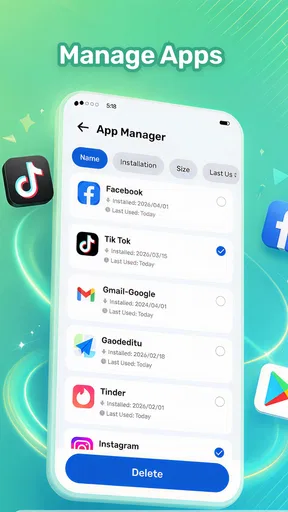
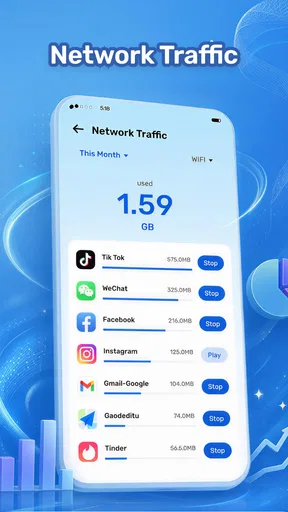
There is also a broader limitation common to focused cleaning apps: they are only as useful as the categories they address. OneCleaner is well suited to large files and duplicate photos, but a person looking for detailed app-cache control, folder synchronization, cloud-backup management, or a full file explorer may prefer the tools already built into the phone or a dedicated file manager.
That comparison is important. The built-in storage screen is often the better choice when I need a broad overview of applications, media, and system usage. A gallery app may be better for sorting albums and preserving favorite images. A file manager is preferable when I need to navigate folders, rename documents, move files, or understand exactly where an item lives. OneCleaner earns its place when I want a more focused cleanup starting point, not when I need to replace all of those tools.
Who should use it, and who should skip it?
I would recommend OneCleaner to people whose phones regularly fill with photos and videos, especially users who do not enjoy digging through folders. It is also a reasonable option for someone who wants a free, uncomplicated way to begin a storage review without learning a complex file-management system.
It may suit family members who need a visual prompt before deleting media, provided someone can help them review important files. The same applies to anyone preparing for a trip, clearing space for a large download, or trying to make an older phone feel less crowded without removing applications they still use.
I would skip it if my main problem is not duplicate media or oversized files. If I need secure archiving, detailed backups, advanced folder operations, or automatic long-term organization, I would choose a purpose-built alternative. I would also skip installing another cleaner if my phone already has a storage tool that clearly handles these tasks and I am comfortable using it.
Privacy-conscious users should adopt a cautious workflow with any app that examines personal media. I would read the permission prompts carefully, avoid rushing through selections, and keep important photographs backed up before a large cleanup. Those are not reasons to reject OneCleaner outright; they are sensible safeguards whenever an app helps manage irreplaceable files.
My long-term verdict
OneCleaner earns lasting space on my phone only when I give it a specific job. Its strongest role is an occasional inspection tool for large files and duplicate photos, not an always-running promise to make the device faster. Used that way, it can turn an unpleasant storage problem into a short, organized review.
The app’s free price and broad Android compatibility lower the barrier to trying it, while its focused purpose keeps the learning curve manageable. The moderate rating tells me to keep expectations realistic: this is not a universal replacement for the phone’s own storage controls, a gallery, and a full file manager.
My final recommendation is conditional but positive. If your storage fills because of repeated photographs and oversized media, OneCleaner is worth testing and may become useful as part of a monthly routine. Start conservatively, review suggestions instead of blindly accepting them, and preserve important files before deleting anything. If your needs go beyond those cleanup tasks, the built-in tools or a more specialized alternative will probably serve you better.
The app earns recurring value through a sensible maintenance habit, not through constant use. That is exactly why I would keep it available for the moments when storage becomes a real problem, while resisting the temptation to treat every scan as necessary.
Verdict
Strengths of OneCleaner
- Quickly identifies large, old, and duplicate files.
- Simple interface makes storage cleanup easy for beginners.
- Helps organize photos and remove unwanted media efficiently.
- Can free space without requiring advanced technical knowledge.
- Useful overview of storage usage and unnecessary files.
Limitations of OneCleaner
- Some cleanup suggestions may require careful manual review.
- Duplicate detection may occasionally flag similar files incorrectly.
- Aggressive cleaning can remove files you intended to keep.
- Advanced tools or features may be limited behind in-app purchases.
- Performance and available features can vary by device and Android version.
Similar Picks in This Category
View All
Google LLC4.0

Gboard - the Google Keyboard
Google LLC4.5

Google Play services
Google LLC4.3

Google Play Store
Google LLC4.9

Files by Google
Google LLC4.5

SHAREit: Transfer, Share Files
Smart Media4U Technology Pte.Ltd.4.3
Frequently Asked Questions
What is OneCleaner, and what does it do?
OneCleaner is a mobile cleaning and storage-management app designed to help users identify unnecessary files, duplicate or similar photos, large videos, and other items that may be taking up space. After scanning your device, it presents categories for review so you can decide what to remove. Its usefulness depends on the permissions supported by your Android or iOS version and the type of files the app can access.
Is OneCleaner safe to use, and can it delete important files?
OneCleaner can be useful for finding clutter, but users should always review the scan results before confirming deletion. Cleaning tools may identify screenshots, duplicate images, cached content, downloads, or large media that appear unnecessary but could still be valuable. Avoid using a one-tap cleanup option unless you have checked the selected items, and keep a backup of important photos and documents first.
Does OneCleaner require access to my photos, files, or other personal data?
Yes, a cleaner application generally needs permission to inspect storage, photos, or media in order to calculate what can be removed. OneCleaner’s available permissions may differ between Android and iOS, and some features may require additional access. Before accepting, read the permission request carefully and review the app’s privacy policy to understand how scanned information is handled.
Is OneCleaner free, or does it include subscriptions and in-app purchases?
OneCleaner may offer basic cleaning features at no cost while reserving advanced tools, unlimited scans, or an ad-free experience for a premium plan. Pricing, trial periods, and subscription terms can vary by platform, region, and app version. Check the purchase screen before starting a trial, especially the renewal date, cancellation method, and whether payment will be charged automatically.
Will OneCleaner improve my phone’s speed or battery life?
OneCleaner can help free storage space, which may make it easier to manage a device with very little available capacity. However, removing files does not guarantee a major increase in speed or battery life. Modern Android and iOS systems manage memory automatically, so the app is most valuable for organizing storage and finding unwanted media rather than providing a permanent performance boost.
